Guides
How to collect emails from Instagram with a free download
By Naved Naik · Published · Last updated
Read as MarkdownQuick answer
To collect emails from Instagram, offer one useful free file, link to its signup page from your profile, and explain what visitors receive. In Dojvo, a Free download block collects an email before releasing the file. You can export those contacts as CSV. Marketing emails and automated follow-ups need a separate email service and appropriate permission.
A follower should know why they are giving you their email. ‘Join my community’ is vague. ‘Get the one-page meal-prep checklist’ describes something they can use today. Start with a small promise you can keep, then make the signup and download easy to finish on a phone.
What freebie would someone actually use?
Choose a task your posts already help with. A food creator might share a shopping checklist. A photographer might offer a shoot-preparation sheet. A tutor might share a revision planner. These are examples, not claims about Dojvo customers or conversion results.
Keep the first version small enough that you can finish and maintain it. A single practical page can be more useful than a long ebook that repeats your captions. Name the result plainly and mention the format. If the download is a ZIP of presets, explain what app and version it needs before asking for an email.
How do you create the free download in Dojvo?
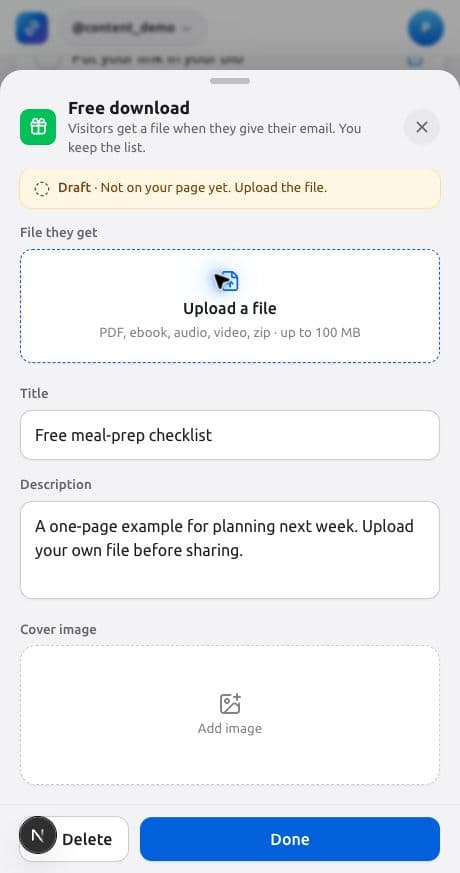
Open the page’s Editor, use Add another block and choose Free download. The editor distinguishes unfinished drafts from blocks that are ready for visitors. Until you upload the file, the block remains a draft; switching it on is not enough to make an incomplete block live.
- Upload the file visitors should receive. Dojvo’s file limit is 100 MB.
- Add a specific title and describe what is inside.
- Use More options to change the button text, such as ‘Get the checklist’.
- Leave name collection off unless you have a reason to need it; email is collected by the download flow.
- Check the Link ending for the block’s individual page. Review the saved block and make sure it is enabled.
What should you tell people before they sign up?
Say what the address will be used for. Requesting a file does not automatically settle whether you can send an ongoing marketing newsletter. Keep the offer and any follow-up expectation clear, and follow the consent requirements that apply to your audience and email provider.
Dojvo’s current download editor provides email collection and an optional name field. It does not give you a custom marketing-consent checkbox or a double-opt-in campaign builder. If your newsletter needs separate confirmation, use a suitable signup flow with your email service rather than treating every download as a newsletter subscription.
A useful description might be: ‘Enter your email to download the checklist. For the weekly newsletter, sign up separately using the newsletter link.’ Only promise that separation if it matches what you actually do. Link to your privacy information and explain how people can contact you.
Where should the download link go?
For a page with several offers, put the freebie near the top while you are promoting it. Use the same title in the Instagram caption and on the download block. If the post says ‘the budget planner’, a button saying ‘Resources’ adds an unnecessary guessing step.
You can share either your Dojvo profile page or the download’s individual page. The individual page is useful when a post has one clear purpose. The profile page works when visitors also need your videos, shop or contact options. Our Instagram page guide explains the broader setup.
What should you test before announcing it?
Start inside Instagram and follow your own link as a visitor would. Confirm that the title is readable and the form is usable on a small screen. Use an email address you control for the test. Complete the form and open the downloaded file; checking that the button appears is only the beginning.
Dojvo stores the uploaded free-download file privately and releases access through the form flow. That does not prevent a recipient from sharing their copy later. A free download should be something you are comfortable distributing. Keep valuable paid files in a payment-protected delivery system instead.
- Confirm the file is the correct version and opens on a phone.
- Complete the form with an address you control.
- Check that the contact appears under Audience for the right page.
- Check the export before importing contacts elsewhere.
- Fix any mismatch between the post’s promise and the file before promoting it.
What happens after someone downloads it?
In Dojvo, go to Audience to view the collected contacts and export CSV. That file is a way to move data; it is not an email campaign. Dojvo does not currently send creator newsletters or automated marketing sequences for you.
If you use a separate email platform, import only the contacts you are permitted to market to and follow that platform’s import and permission rules. Keep your permission records outside Dojvo where needed. Plan a short, useful first message: explain who you are, why the person is receiving it and how to unsubscribe. Never claim a download form has recorded a separate consent choice that it does not actually collect.
How do you improve the offer without guessing?
Look at page visits, clicks and collected leads together. If the page gets visits but the download gets few taps, make the title more specific or move the offer higher. If people tap but do not complete the form, inspect the visitor experience and the information requested before adding another promotion.
Change one thing at a time and write down the date. A new cover, title and audience all at once make it hard to learn what helped. When you are ready to offer a paid version, follow the PDF selling guide; free-file delivery and paid-file delivery use different workflows. You can check what the subscription includes on Dojvo pricing.
Common questions
Do I need a separate website to collect emails?
No. You can use a hosted download page such as a Dojvo Free download block. If you need newsletter confirmation, automated emails or custom consent fields, choose an email service with those features.
Does Dojvo send the newsletter for me?
No. Dojvo collects download emails and lets you export them. Use a separate email platform for newsletters and marketing automation, with the necessary permission from recipients.
Can I collect names too?
Yes. In the Free download editor, open More options and enable ‘Also ask for their name’. The email collection is part of the download flow.
Sources and checks
Sources checked on 1 November 2026. Product steps checked against the current Dojvo editor. Provider features and prices can change.
Give visitors one useful thing to download.
Try Dojvo for 7 days, no card needed. Then ₹299 or US$6 a month. External checkout fees are separate.
Start your free trial →