Guides
How to add a WhatsApp link to your Instagram bio
By Naved Naik · Published · Last updated
Read as MarkdownQuick answer
Create a WhatsApp chat link using https://wa.me/ followed by your full international phone number as digits only. Add it through Instagram’s Edit profile → Links → Add external link controls, or place it on your bio page. For India, start with 91 and your number. Test with an active WhatsApp account before sharing.
A customer who wants to ask about an order should not have to copy your number, save a contact and search for you. A WhatsApp chat link gives them a direct route to start a conversation. You can use it as the profile link or as a clearly labelled button beside your other links.
What is the correct WhatsApp link format?
WhatsApp’s official click-to-chat guidance uses a full international number after wa.me. Leave out the plus sign, spaces, brackets and dashes, and do not add an international dialling prefix such as 00. Use a number with an active WhatsApp account.
For an Indian number, the pattern is https://wa.me/91XXXXXXXXXX. The X characters are placeholders for your actual number, so this example cannot open a real chat. Avoid adding a domestic leading zero before the mobile number. For other countries, use that country’s calling code and the correctly formatted number.
| Part | What to enter |
|---|---|
| Base address | https://wa.me/ |
| Country code for India | 91 |
| Phone number | Your own active WhatsApp number, in international format |
| Remove | +, spaces, brackets, dashes and dialling prefixes |
How do you add a pre-filled message?
Add ?text= followed by a URL-encoded message. For example, the message ‘Hi, I have a question’ becomes Hi%2C%20I%20have%20a%20question. The full placeholder pattern is https://wa.me/91XXXXXXXXXX?text=Hi%2C%20I%20have%20a%20question.
The message appears in the visitor’s text field; it is not sent automatically. Keep it short and useful, such as asking about a specific service. Do not put a customer’s personal details into a public link. If you edit the message, encode it again so spaces, punctuation and non-English characters survive the URL correctly.
How do you put the link in your Instagram profile?
Use Instagram’s external link controls for a regular clickable URL. You do not need a special WhatsApp generator to create the basic link. Instagram may also offer WhatsApp contact controls for eligible business profiles, but the wa.me method is a separate external-link approach.
- Open your Instagram profile and choose Edit profile.
- Open Links and choose Add external link; the labels may vary by app version.
- Paste your complete wa.me URL with your own number.
- Use a clear title, such as ‘Ask about an order on WhatsApp’, if the app offers a title field.
- Save, return to the profile and tap the link to check the recipient and any pre-filled message.
- Putting the address in ordinary bio text is not the same as adding it to the clickable link field.
- Use a business contact number you are comfortable making public.
- An external chat link does not create an automated reply system or a booking calendar.
How do you place WhatsApp beside your other links?
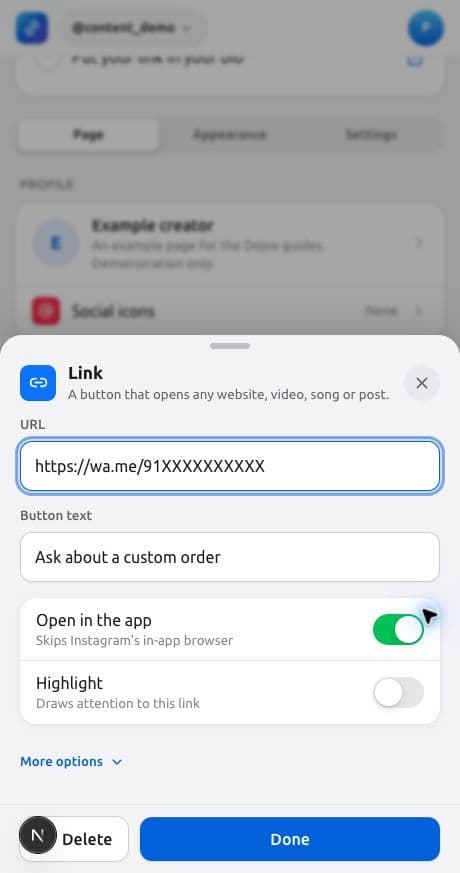
If your profile also needs a shop, videos or a free download, add the wa.me URL to a Link block on your Dojvo page. A labelled block tells the visitor why to message you. You can also add WhatsApp through the profile’s Social icons controls if a small contact icon is enough.
For enquiries, a title like ‘Ask about a custom order’ gives more context than ‘Contact’. If your replies are limited to certain hours, say so in a nearby Text block. Publish only promises you can meet; the button does not create a staffed support service.
- In your page’s Editor, choose Add another block → Link.
- Enter a title that says what the conversation is for.
- Paste your complete wa.me URL and confirm the block is enabled.
- Place it near the relevant product or service.
- Use your Dojvo page address in Instagram’s external-link field and test the route.
Why is the WhatsApp link not working?
Start with the number. The most common thing to check is the full international format: country code present, no plus sign or separators, and no accidental domestic prefix. Then confirm that the intended number has an active WhatsApp account. Check for a copied full stop at the end of the URL.
If you added a message, try the plain number-only URL first. If that works, rebuild the encoded message. Test from a phone as well as a desktop: the desktop route may use WhatsApp Web, while a mobile route may offer the app. App installation, sign-in state and browser choices can change the result.
If the chat opens for the wrong recipient, remove the public link until you correct it. A successful page load alone is not enough; check the recipient inside WhatsApp. Do not send a test message to someone else just to see whether the link works.
Should you use your personal phone number?
A public wa.me link contains the phone number in its address. Anyone who can see the link can read that number. Use a dedicated business number if you want to keep personal contact details separate. Do not publish another person’s number without their permission.
Make the purpose of the button clear so you get relevant enquiries. For a service that needs name, email and a preferred time, a request form may be easier to manage than a free-form chat. Dojvo’s booking block collects those requests, but it does not reserve a calendar slot or collect payment.
How do you know whether the button is useful?
Dojvo analytics can show that someone clicked the WhatsApp link. It cannot confirm that they sent a message, completed an order or became a customer. Compare clicks with your own enquiry records without treating the two numbers as the same thing.
If visitors keep asking the same question, add the answer next to the button. If the chat is about a paid PDF, show the price and delivery details first; the PDF selling guide can help. For the rest of your profile, see link in bio for Instagram and our free-download setup.
Common questions
Do I need WhatsApp Business to create a wa.me link?
WhatsApp’s click-to-chat guidance requires an active WhatsApp account for the recipient number. The basic external chat link is separate from any business-profile contact integration.
Does the pre-filled message send automatically?
No. It fills the message field so the visitor can review, edit and send it.
Can I hide my number inside the chat link?
A normal wa.me link includes the destination number in the URL. A bio-page button can shorten what is displayed, but it does not make that destination private.
Sources and checks
Sources checked on 1 November 2026. Product steps checked against the current Dojvo editor. Provider features and prices can change.
Put your contact button beside the offer people are asking about.
Try Dojvo for 7 days, no card needed. Then ₹299 or US$6 a month. External checkout fees are separate.
Start your free trial →