Alternatives
Linktree alternatives: choose by what you actually need
By Naved Naik · Published · Last updated
Read as MarkdownQuick answer
The right Linktree alternative depends on the job: Carrd for a flexible one-page site, Payhip for paid downloads, Stan for courses and bookings, Lnk.Bio for a simple link hub, or Dojvo for links, external checkout products and email-gated freebies. Linktree itself remains a sensible option if its free plan covers your needs.
Before moving your bio link, write down what is missing. Is it a price you can justify, a file that needs delivering, or a page you want to design differently? Those lead to different choices. This comparison is published by Dojvo, so we make our own limits explicit too. Prices and feature references were checked on 1 November 2026; this is a comparison of documented features, not a claim that we ran every competitor through a paid trial.
Which alternative fits your next task?
Compare the entire workflow rather than the longest feature list. A page builder can send someone to a shop without being the shop. A booking request can collect an enquiry without reserving a time slot. Those distinctions matter more than a similar-looking button.
| Tool | A useful starting point | Cost reference | Check before choosing |
|---|---|---|---|
| Dojvo | Links, external checkout products, free downloads and booking requests | 7-day trial; ₹299 or US$6/month | No paid-file delivery, built-in checkout or calendar scheduling |
| Carrd | A one-page website with more layout control | Free option; Pro Standard US$19/year | Forms and custom domains need an appropriate Pro plan; checkout is a separate service |
| Payhip | Selling and automatically delivering digital files | US$0/month + 5%; paid plans reduce platform fees | Check gateway availability and processing costs for your country |
| Stan | Courses, a creator store and calendar tools | Creator US$29/month; Pro US$99/month | No permanent free store; advanced email tools are on Pro |
| Lnk.Bio | A straightforward page of links | Free and paid options; see current pricing | Check the exact plan for customisation and selling requirements |
| Linktree | An established link hub with a permanent free plan | Free and region-dependent paid plans | Earn eligibility and seller fees depend on the plan and country |
When does Dojvo make sense?
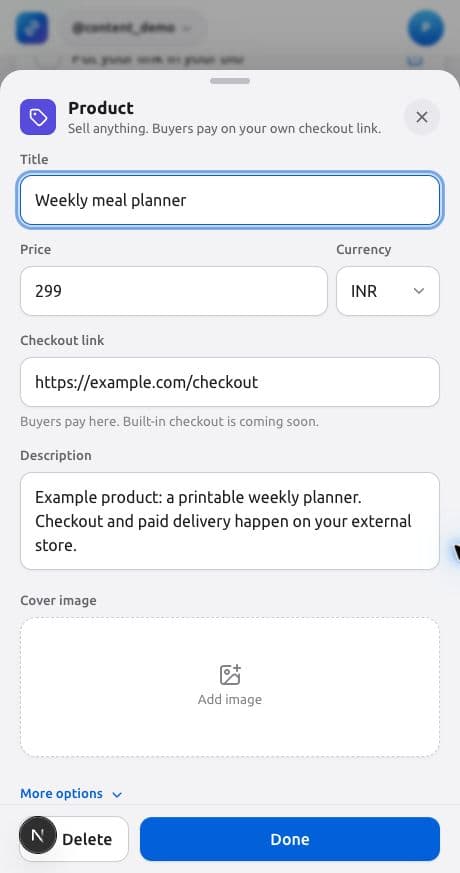
Choose Dojvo if you already know where buyers will pay and want a tidy front page for everything else. You can add a Product block pointing to that checkout, a free file that collects an email, a video link and a request form for a session. One account supports up to 25 pages, so you do not need a separate login for each project.
The subscription is ₹299/month or ₹2,499/year in India, and US$6/month or US$49/year elsewhere, after a seven-day trial without a card. Dojvo charges 0% commission; your checkout provider can still charge fees. There is no permanent free plan.
Dojvo is a poor fit if you need a course player, paid PDF fulfilment, automated email sequences or a calendar that books available slots. Those are not included. Our product comparison with Linktree covers the narrower question of switching to Dojvo.
Would a small website serve you better?
Carrd is worth considering when the layout is the problem. You may want a longer introduction, a portfolio section and a contact form rather than a stack of buttons. Its Pro plans separate features such as custom domains, forms and embeds; Pro Standard is listed at US$19/year.
That can be good value if you are comfortable assembling the page and connecting the services you need. Budget for the shop, email provider or scheduler you plan to use alongside it. More design freedom also gives you more decisions to make. If your only goal is sharing three links, a free hub may be enough.
Do you need the tool to deliver a paid file?
Payhip is a stronger starting point when the transaction and download belong together. Its digital-product documentation describes uploading the file, setting a price and giving customers a download after purchase, with a receipt containing a download link.
The pricing page lists a free plan with a 5% platform fee, Plus at US$29/month with 2%, and Pro at US$99/month without a platform transaction fee. Processor charges are separate. Check payment gateways and seller eligibility in your country before building the whole shop. A free subscription is useful, but its total cost depends on sales.
Are courses and scheduled sessions central to your business?
Stan bundles more of that workflow. Its plan comparison lists a course builder, calendar tools and lead collection on Creator. Creator Pro adds features including email broadcasts and flows. The monthly prices are US$29 and US$99 respectively; annual billing is also available.
If you use those capabilities, comparing Stan only with a US$6 link page misses the point. It may replace several services. If you only need a few links and already have checkout elsewhere, you may be paying for tools you will not use. Our Stan alternative page explains what Dojvo can cover and what you would still need separately.
What if you just want a simple page of links?
Look at Lnk.Bio and the free Linktree plan before paying for a storefront. Lnk.Bio presents a link-focused service with free and paid options. Use its current pricing to check the controls you care about rather than assuming every advertised feature is free.
You may also be better off staying with Linktree. It has a permanent free plan, while its pricing advertises 0% seller fees on Pro and Premium. Its fee guidance distinguishes platform fees from payment processing and notes country restrictions for earning features. A blanket claim that Linktree always takes a sales percentage would be misleading.
How do you compare the real cost?
Use this small calculation: subscription + platform sales fees + payment processing + any extra email, booking or delivery service. For an illustrative US$500 of monthly sales, a 5% platform fee alone is US$25 before processing. That arithmetic does not prove a US$6 hub is cheaper overall: the hub may need a separate paid delivery service.
Make a list of the three things your visitor must finish. For example: watch a video, buy a PDF and request a consultation. Then test each one on your phone. Can a buyer receive the file? Can a visitor tell whether a session is confirmed? Is the final price clear? Choose the cheapest setup that completes those tasks reliably, not the cheapest headline price.
How can you switch without losing useful links?
Keep your current page available while you build the replacement. Copy the destinations, not just the button labels, and put your main action first. If you use Dojvo, Linktree import can bring over public links and profile details; check the result before changing your Instagram profile.
Test from a second device and from the social app where your audience will tap. Keep a note of your old analytics before switching: a new tool does not necessarily carry over historical data. If your next task is selling, start with our PDF selling guide. If it is collecting subscribers, use the free-download guide.
Common questions
Is Dojvo a free Linktree alternative?
Dojvo has a seven-day trial without a card, followed by a paid subscription. For a permanent free option, compare Linktree, Lnk.Bio, Carrd or Payhip, while checking their feature limits and any sales fees.
Which alternative is best for selling PDFs?
Start with a service that handles both checkout and paid-file delivery, such as Payhip, if you need those together. Dojvo can link to that checkout but does not automatically deliver paid files itself.
Does 0% commission mean no fees at all?
No. A platform can charge 0% sales commission while charging a subscription. Payment processing and any separate checkout service may also cost money.
Sources and checks
Sources checked on 1 November 2026. Product steps checked against the current Dojvo editor. Provider features and prices can change.
Already have a checkout? Try building the page around it.
Try Dojvo for 7 days, no card needed. Then ₹299 or US$6 a month. External checkout fees are separate.
Start your free trial →